Debugging a Double-Encoded Syslog Issue with Technitium DNS Server

The Problem
While setting up centralized logging for my homelab, I ran into a deceptively annoying issue with Technitium DNS Server logs being double-encoded when sent to syslog. The logs were technically arriving in Graylog, but they were nearly unusable without extra parsing gymnastics.
This post documents what was happening, and how I fixed it.
The Setup
- Technitium DNS Server(s)
- Hosted on Ubuntu VM using Docker
- Log Exporter app in Technitium configured to send logs to syslog server over UDP
- Graylog
- Hosted on Ubuntu VM using Docker
- Acts as central logging infrastructure and Syslog server
The Symptoms
- In Graylog, the Technitium logs looked... wrong
- Instead of clean syslog message, which Graylog should easily be able to parse and extract fields from, it appeared the logs were being "double-encoded"
- The RFC5424 message appeared inside $msg
- There were two PRI fields
- What I saw in the Graylog platform
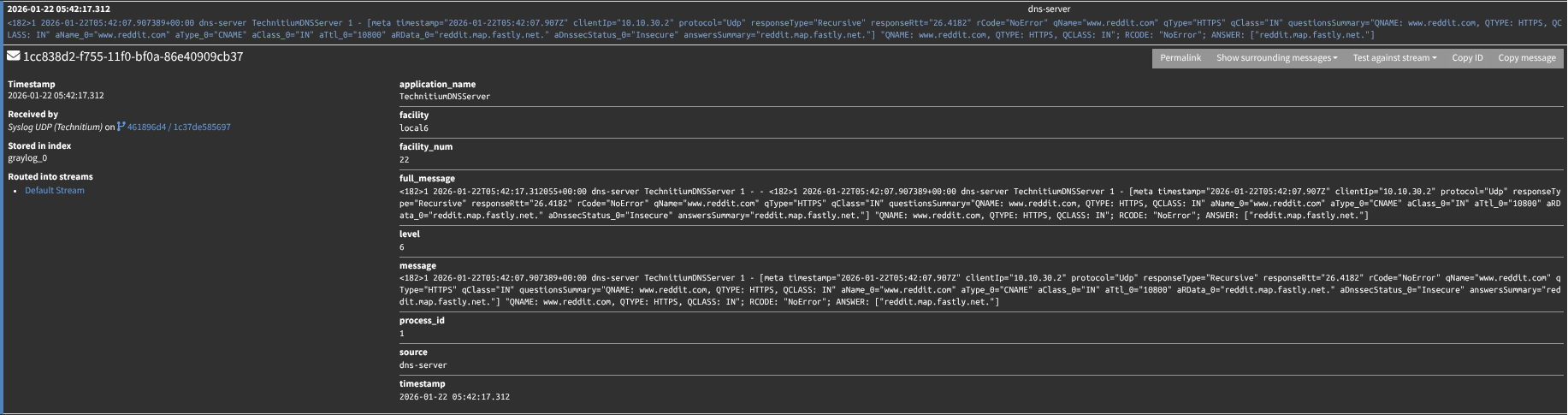
In short: the syslog message was wrapped inside another syslog message.
Why this happens
With Technitium’s Log Exporter, the payload Graylog receives looks like a normal syslog message, but the message body itself contains another full RFC5424 syslog line (starting with <PRI>1 ...). In other words, it’s “syslog inside syslog.”
I don’t know whether this is expected behavior from the Log Exporter app or an implementation detail of how it formats events, but the practical effect is the same: Graylog parses the outer syslog envelope, then displays the inner syslog header as part of the message text—resulting in duplicated/odd fields.
The Fix: Extract and Forward the Inner Message
Instead of making a crazy complicated pipeline to correctly extract the fields from, I wanted a way to strip the 'first' syslog message. If Graylog just received the 'second' syslog message, it can automatically extract the fields in the RFC5424 message.
Basic Overview
- Setup a rsyslog server that you will send Technitium logs to instead of Graylog
- Configure a template to forward the 'inner' syslog message to Graylog
- Ship the 'inner' syslog message to Graylog
- Graylog correctly parses and extracts fields so logs are actually usable
Technical Overview
- Create new docker rsyslog container. I configured the new container in the same docker compose stack as my Graylog stack. Here is what the container looks like in my docker-compose.yml file
  # This container takes syslog messages from Technitium, removes the 'first' syslog message, ships the 'second' syslog message to Graylog
  rsyslog:
    image: rsyslog/rsyslog-collector
    container_name: rsyslog
    restart: unless-stopped
    volumes:
      - ./rsyslog.conf:/etc/rsyslog.conf:ro
      - rsyslog-spool:/var/spool/rsyslog
    ports:
      - 1515:1515/udp
    networks:
      - graylog
- Note: Docker
Ports:defaults to TCP unless you add/udp. - In the root directory of your docker compose stack, create a rsyslog.conf file
# Modules
module(load="imudp")

# Templates (must be top-level, not inside if-block)
template(name="ForwardInner" type="string" string="%$!inner%\n")
template(name="ForwardMsg"   type="string" string="%msg%\n")

# Listen for Technitium
input(type="imudp" port="1515")

# Process Technitium messages
if ($programname == "TechnitiumDNSServer") then {

  # Grab the inner RFC5424 syslog line after the outer "- - "
  set $!inner = re_extract($msg, ' - - (<[0-9]+>1 .* )$', 0, 1, "NO_MATCH");

  if ($!inner != "NO_MATCH") then {
    action(type="omfwd"
           target="graylog"
           port="1515"
           protocol="udp"
           template="ForwardInner")
  } else {
    action(type="omfwd"
           target="graylog"
           port="1515"
           protocol="udp"
           template="ForwardMsg")
  }

  stop
}
Note: Because Graylog and rsyslog are in the same docker network, I am sending logs from rsyslog to Graylog using the docker network, so using "graylog" (the hostname of the Graylog container in the docker network) as the target, and the same port on the Graylog server. Do not expose port 1515 of Graylog container on host, only needed inside the docker network.
- Setup new input in Graylog
- System / Inputs > Syslog UDP > Launch new input
- Title: Syslog UDP (Technitium)
- Port: 1515
- Allow overriding date: Yes
- Store full message: Yes
- Expand structured data: Yes
- System / Inputs > Syslog UDP > Launch new input
- Install/configure Log Exporter app in Technitium
- Apps > Install > Log Exporter
- Log Exporter > Config
- Under the syslog settings, configure the IP address of Graylog/rsyslog container, port, and enable syslog
The Result
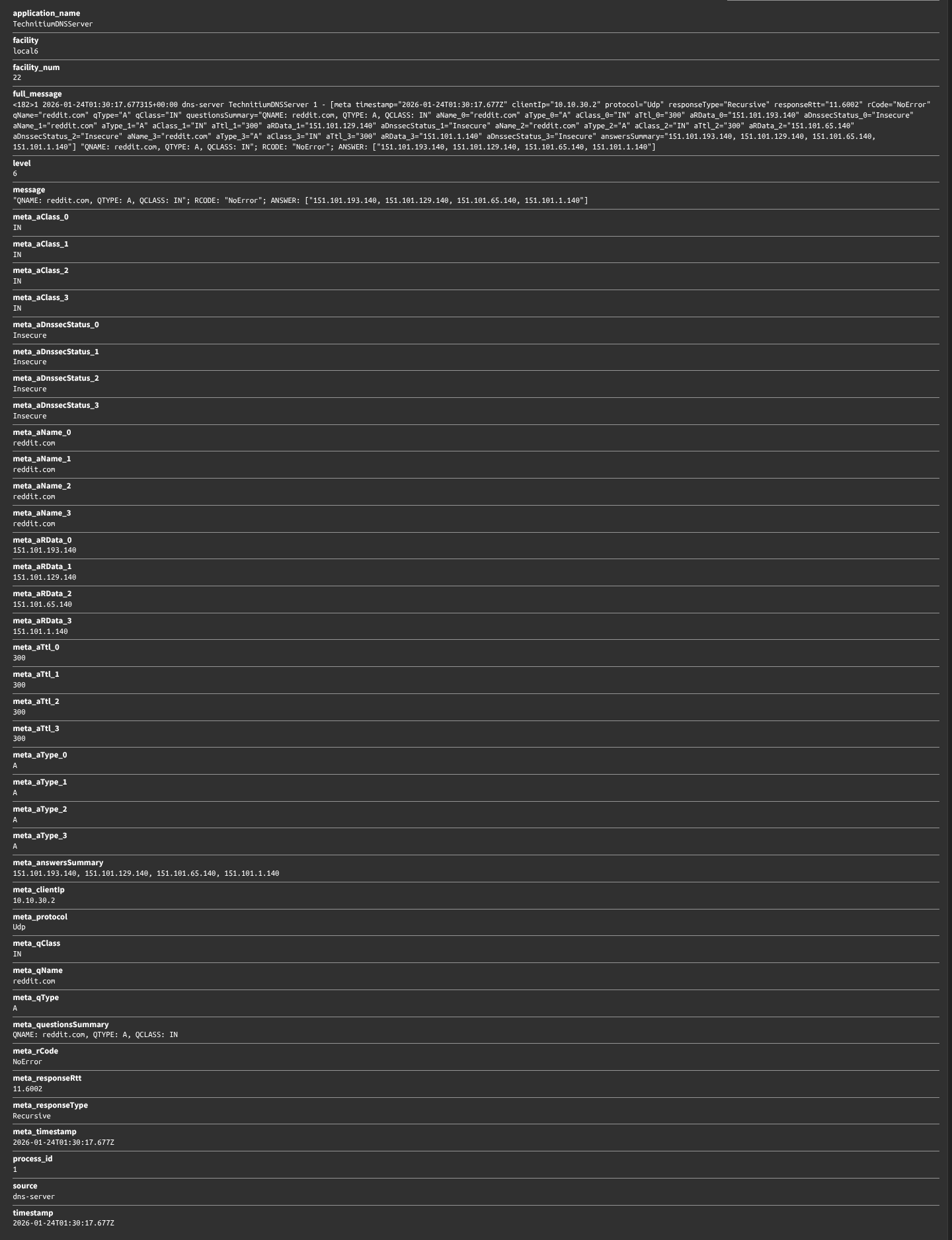
If everything is working as expected, you should now see properly parsed, easily to search messages in Graylog.